The Strava for combat sports Train hard.
Share it with your team.

Clinch lets martial artists track every training session, see their progress and share their martial arts journey with the people they train with.

Log your sessions, follow your teammates, give respect. For BJJ, Muay Thai, Boxing, MMA, Wrestling and Kickboxing, on iPhone through TestFlight.

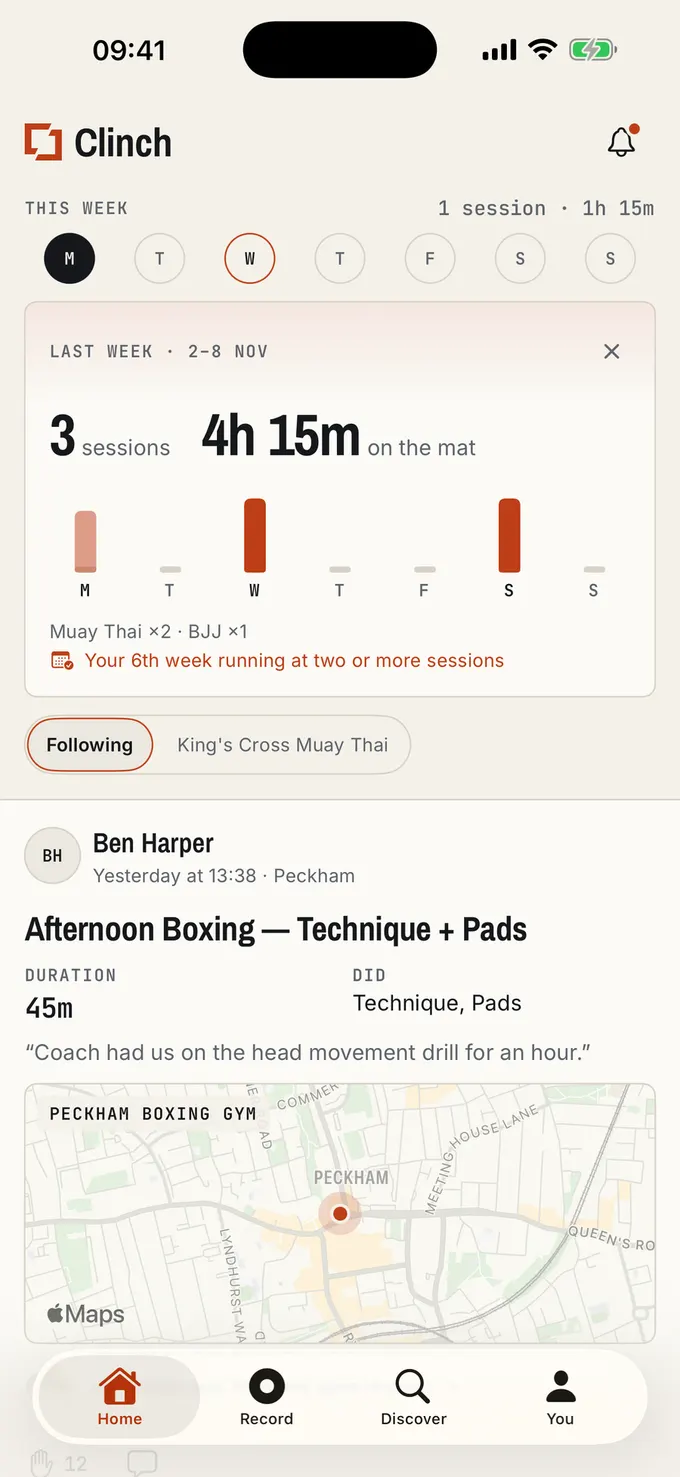
The Clinch home feed: this week's sessions at a glance, then a teammate's boxing session with duration, what they did, where they trained and the respect it got.

Why athletes use Clinch

Training is social. Your training app should be too.

Runners and cyclists have Strava. Fighters and grapplers have had a notes app, a group chat and a fitness tracker that files a Muay Thai class as “Martial Arts, 740 cal”. Clinch is where combat sports athletes log their training and follow each other’s.

  • Keep your gym close between classes

    Follow the people you train with, see who was on the mats this week and give respect when someone puts in the work. The encouragement you get at the gym, all week long.

  • See that you’re getting better

    Months of classes blur together, and progress in combat sports is slow enough to miss. Clinch keeps every session, so on the weeks it feels like nothing is improving you can see the hours, the consistency and the grade you are working towards.

  • Stay consistent without burning out

    Your team sees you turning up, and Clinch counts how many weeks running you have trained two or more times. Consistency is what moves you forward, and recovery is part of training.

How it works

Your team’s training, in one feed.

01The feed, respect and training partners

See who’s training. Give them respect.

Your feed is your gym’s week: who rolled, who sparred, who got back on the mats after a layoff. Give respect when someone puts in the work, leave a comment, and get the same back when it is you. Tag who you trained with and the session lands on both your records, so nobody logs it twice.

  • Newest first, from people you follow. No algorithm deciding what you see.
  • Invite teammates with your QR code: “Scan to train with me.”
  • Share a session as an image for your story, signed with the Clinch mark.
  • Get told when someone follows you, tags you, comments or gives respect.

Maya Chen

Today at 07:10 · King's Cross

Morning Muay Thai — Pads + Clinch

Duration
1h 15m
Did
Pads, Clinch
With
Ben Harper
Avg HR
148 bpm

“Five rounds on pads, then twenty minutes in the clinch. Knees felt sharp.”

Ben, Mia and 10 others gave respect

3

Joe CarterSame again Thursday?

02Fast session logging

Logged before your wraps are off.

If logging is a chore, you stop doing it. Tap Start as class begins, or add the session afterwards. Clinch already knows your art, your gym and how long you usually train, so a regular class takes a few taps. Every session counts, even the ones you nearly forgot.

  • Forgot to press Start? Log a past session with the right date and time.
  • Finishing never posts. You review the session first, then decide who sees it.
  • Recording carries on through a dropped signal in the changing room.
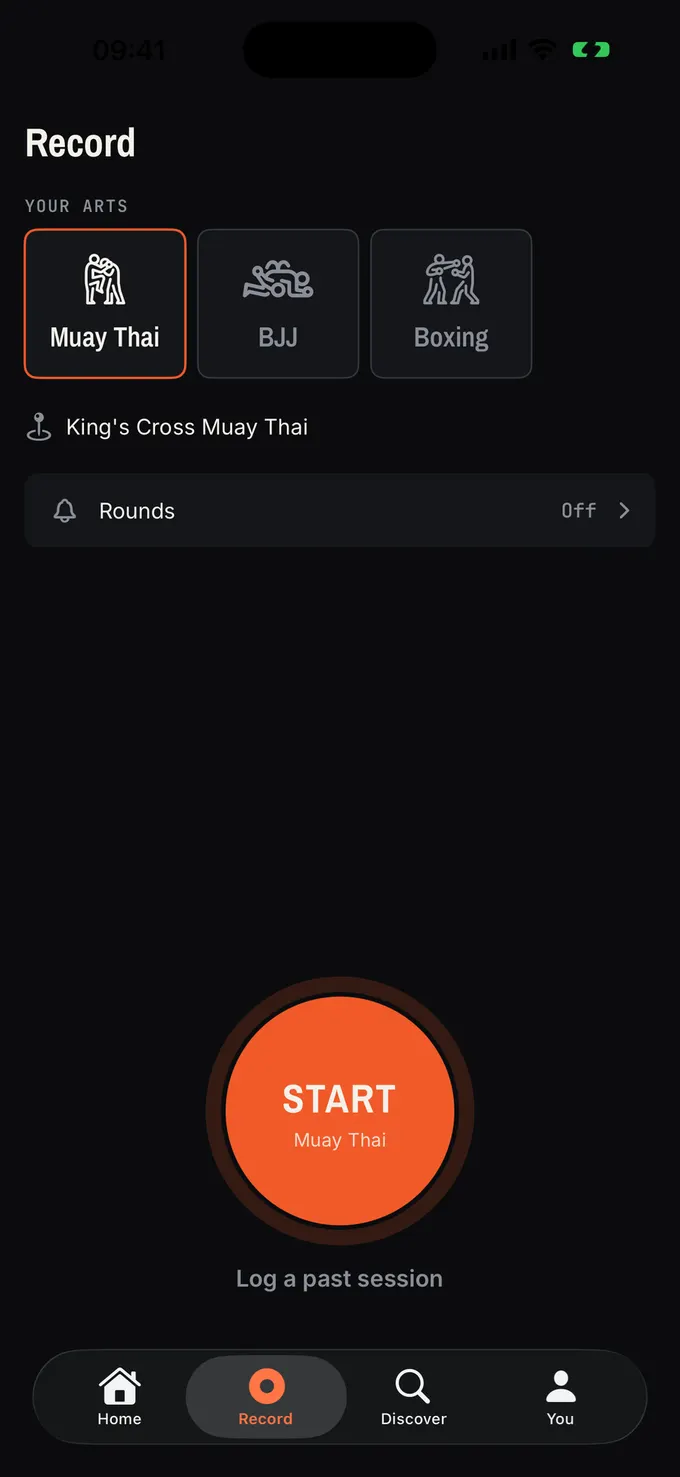
The Record screen: choose Muay Thai, BJJ or Boxing, the home gym is already filled in, and one large Start button.

03Training history and progress

Watch the work add up.

Your hours and sessions, week by week and art by art, next to your belt or grade. When a plateau makes it feel like you are going nowhere, the record shows the consistency progress is built on.

  • See how many weeks running you have trained two or more times, and earn achievements for keeping it going.
  • Your stats update the moment you post. Nothing to tally up.
  • Record your belt or grade per art, or choose not to say.
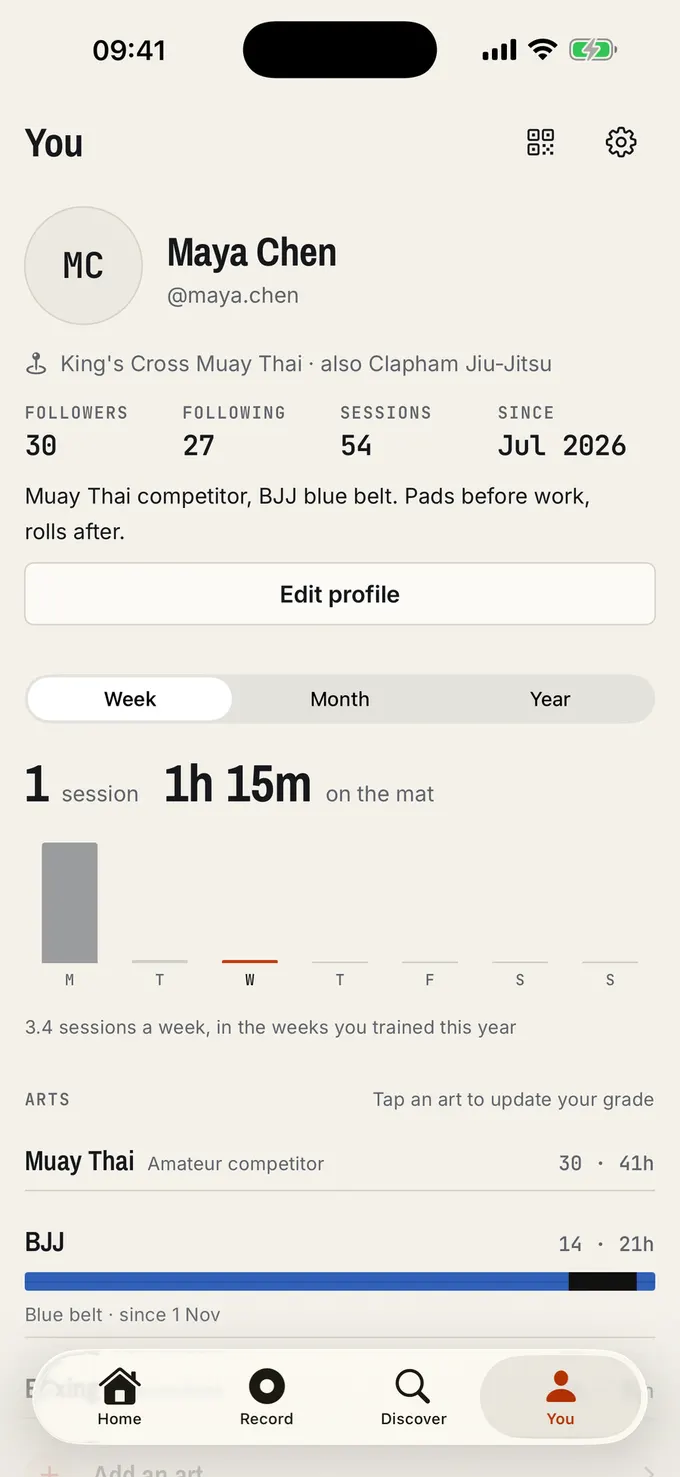
An athlete profile: 54 sessions, a week chart showing 1 hour 15 minutes on the mat, and Muay Thai and BJJ with hours and a blue belt.

Round mode, gyms and wearables

04Round timer with spoken combinations

One app from first bell to last.

Most strikers time rounds in one app and log the session in another, if they log it at all. Round mode puts the bell, the rest periods and the calls inside your Clinch session and counts the rounds for you. When the last bell goes, the session is already timed and counted.

  • Presets for each art, from 3 × 3:00 on the bag to 5 × 5:00 for MMA, or set your own.
  • Spoken calls at three levels: combinations for boxing, kicks and knees for Muay Thai, shots and sprawls for wrestling.
  • A warning bell ten seconds before each round ends.

For Boxing, Muay Thai, MMA, Kickboxing and Wrestling. Not BJJ: rolls run on the coach’s clock. The phone here is running: pick an art, pause it, mute the calls.

ROUND 2 OF 5

7:41 total

5 × 3:00 · 2:00 rest · Calls: Intermediate

05Gyms and the training map

Know who trains where.

Your gym is a real place on Clinch, not a line of text. See who else trains at your home gym and find teammates to follow. Your training map shows every gym you have trained at and the hours you put in there, along with where the people you follow train, handy when you are dropping in somewhere new.

  • Train at more than one club? Add them all, with one home gym.
  • Patches mark the milestones: 25 sessions, 50 hours, and more as you go.
  • Where you train follows each session’s privacy setting.
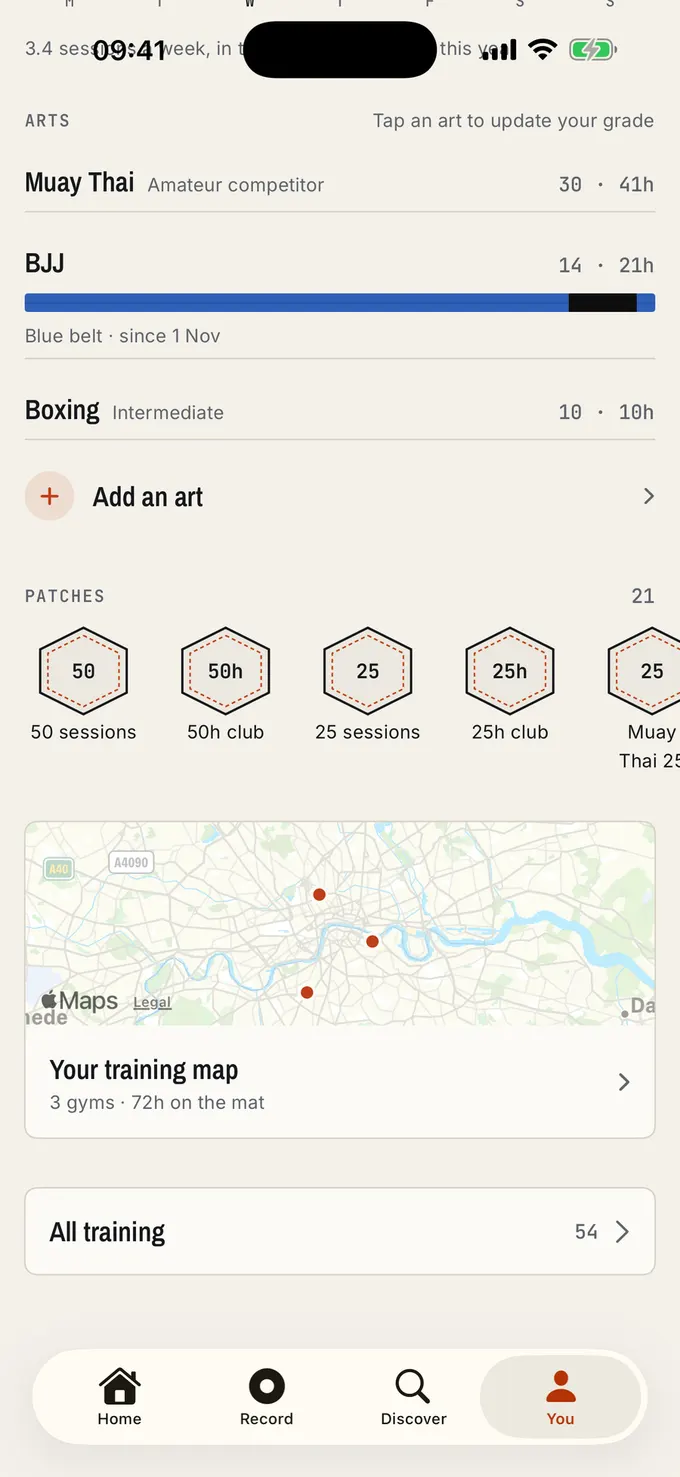
Lower half of an athlete profile: Muay Thai, BJJ and Boxing with sessions and hours, a row of milestone patches such as 50 sessions and 50h club, and a training map of London with three gyms, 72 hours on the mat.

06WHOOP, Polar and Apple Health

Your wearable, finally filed under the right art.

A generic fitness app sees an hour of “workout”. Connect WHOOP, Polar or Apple Health and the heart rate lands on the right Clinch session instead, next to the art, the rounds and who you trained with. When your device records Muay Thai or BJJ, Clinch logs the session for you; edit or remove it afterwards.

  • Average and peak heart rate with time in each zone, shown to the people who can see the session. Hide it on any session, or stop sharing it for future imports.
  • Strain-free: only the workout and its heart rate come in. Clinch never scores strain or intensity.
  • Optional. Clinch works fully with no hardware at all.
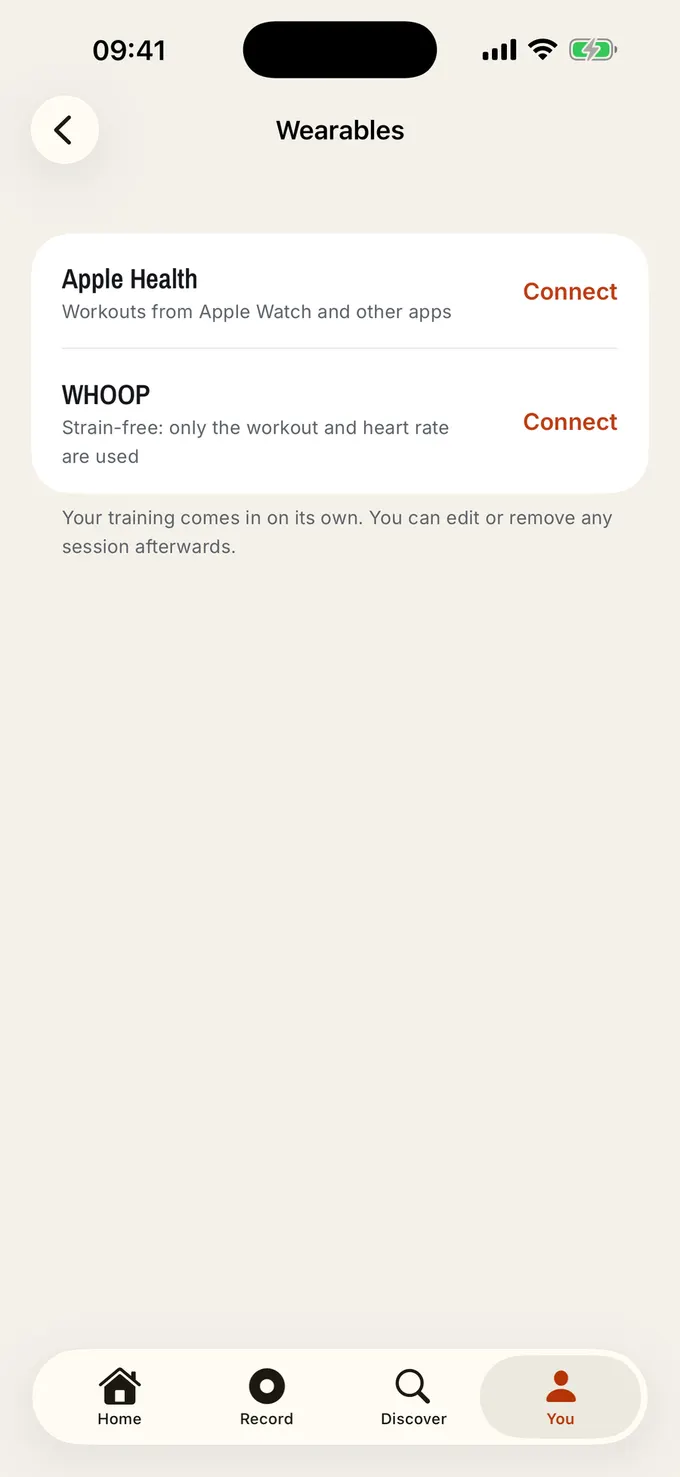
The Wearables screen in Clinch settings: connect Apple Health for workouts from Apple Watch and other apps, or WHOOP, strain-free, using only the workout and heart rate.
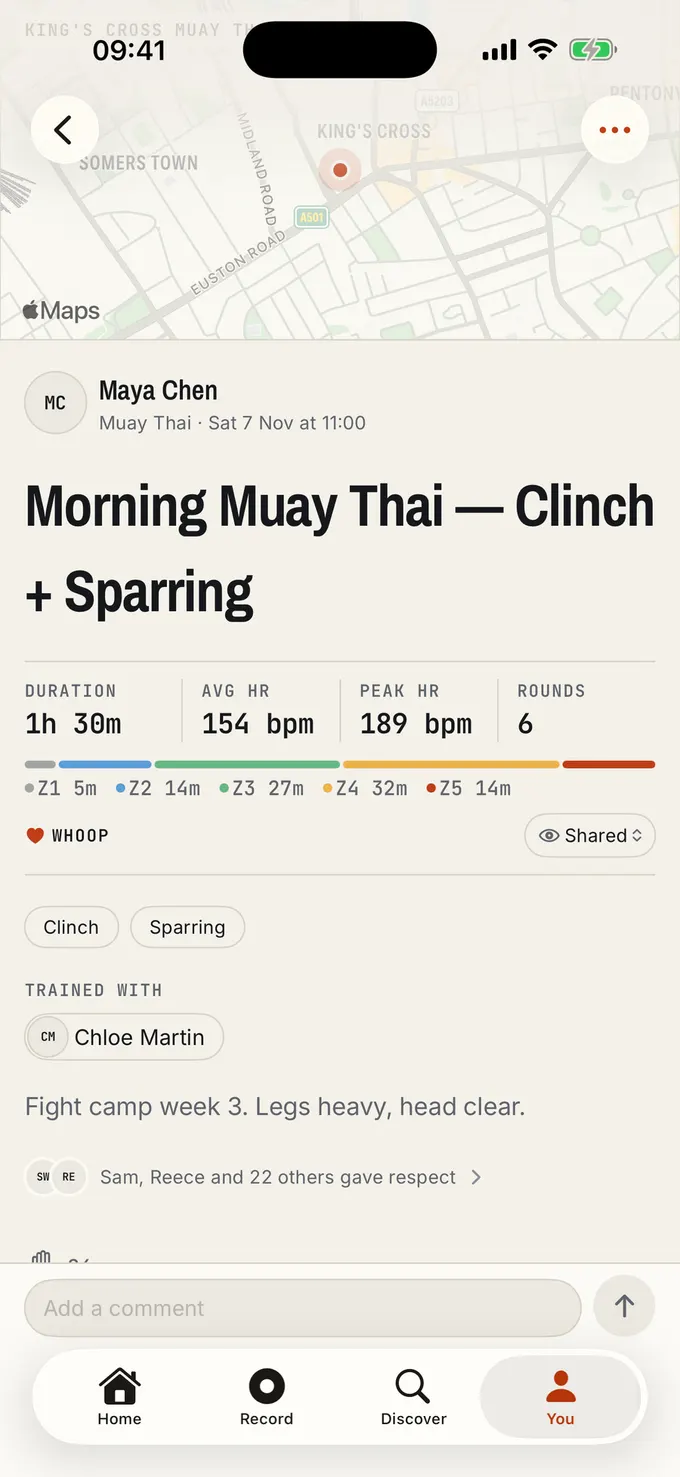
A Muay Thai session imported with WHOOP: 1 hour 30 minutes, average heart rate 154, peak 189, 6 rounds, time in each heart rate zone, clinch and sparring, trained with a partner, and 24 people gave respect.

Martial arts first

Built for six arts, each on its own terms.

A Muay Thai session is pads, clinch and sparring. A BJJ session is gi or no-gi, drilling and rolling. Every art has its own session types and its own grades, so your record reads like your training, not a gym workout.

  • BJJ

    Gi · No-gi · Drilling · Rolling · Open mat

    White to black belt

  • Muay Thai

    Pads · Bag work · Clinch · Sparring

    Beginner to professional

    Round mode
  • Boxing

    Technique · Pads · Bag work · Sparring

    Beginner to professional

    Round mode
  • MMA

    Striking · Grappling · Wrestling · Sparring

    Beginner to professional

    Round mode
  • Wrestling

    Takedowns · Drilling · Live wrestling

    Beginner to professional

    Round mode
  • Kickboxing

    Technique · Pads · Bag work · Sparring

    Beginner to professional

    Round mode

What Clinch stands for

Questions

Before you join.

Something else? Ask us on the support page.

What is Clinch?

Clinch is the social training app for combat sports and martial arts. You log each session in a few taps, follow the people you train with, give respect and comment on their sessions, and watch your hours and consistency build up over time.

Is Clinch like Strava?

In spirit, yes: Strava is where runners and cyclists share their training, and Clinch does the same for combat sports. Instead of pace and distance it is built around what fighters and grapplers track: the art, the session type, rounds, belts and grades, gyms and training partners. Clinch is not affiliated with Strava.

Which martial arts does Clinch support?

BJJ, Muay Thai, Boxing, MMA, Wrestling and Kickboxing. Each has its own session types, such as gi, no-gi and rolling for BJJ or pads, clinch and sparring for Muay Thai, and its own grades, from white to black belt in BJJ and from beginner to professional in the others.

How do I join the beta?

Tap Join the beta on your iPhone. The link opens Apple’s TestFlight app (install it from the App Store if you are asked), which installs the Clinch beta. Then sign in with Apple or Google and log your first session.

Is Clinch on Android?

Not yet. The beta is on iPhone only.

Do I need a WHOOP, Polar or Apple Watch?

No. Clinch works fully without any hardware. If you have WHOOP, Polar or Apple Health, you can connect it to bring heart rate into your sessions, and sessions your device records as Muay Thai or BJJ are logged for you.

Who can see my training?

You choose for every session: everyone on Clinch, your followers or only you, with a default you set once. Your gym and location follow the same choice, and you can block or report anyone.

How does Clinch track consistency?

Week by week. Clinch shows how many weeks running you have trained two or more times, and achievements reward that consistency rather than volume. Recovery is part of training, and nothing in Clinch rewards training through injury.

Does Round mode work for BJJ?

No. Round mode, the round timer with spoken combinations, is for Boxing, Muay Thai, MMA, Kickboxing and Wrestling. BJJ rolls run on the coach’s clock, so Clinch does not add a second bell.
Better with your team.

Join the iPhone beta, log your next class, and invite the people you train with. The feed fills up fast when your whole gym is on it.

Join the beta